Posts

Showing posts with the label ROS

Detecting Lines Using OpenCV on ROS
Image
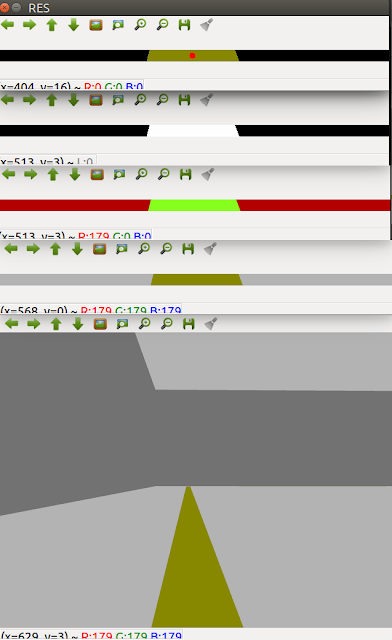
OpenCV is a widely used computer vision library. In order to perform ROS Perception, learning OpenCV is essential. OpenCV uses the BGR (Blue, Green, Red) format whereas ROS uses the RGB (Red, Blue, Green) format. In order to convert this image encoding, we use the Opencv_bridge. Once we have the image in BGR format, it's ready to be processed using OpenCV. The first step is to crop the image in order to work with the minimum size. Hence by doing this, we process only the part of the image that is important to us and discard away the unnecessary parts. The second step is to convert the cropped image to HSV format. HSV removes the image intensity which is very helpful in recognizing the same colors in different lights. Then we define the upper and the lower color boundaries in HSV format to detect a particular color. Say we want to detect yellow color : Lower : [20, 100, 100] Upper : [30, 255, 255] Once we have boundaries defined, we apply a mask on the image to get a binar...
ROS Navigation

Image
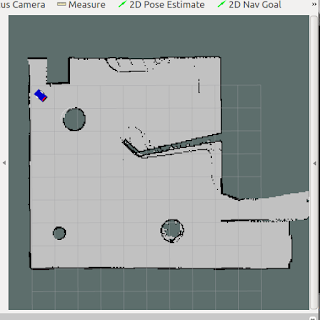
Navigation is of the utmost importance when robots are to be used in a foreign environment. It has to be aware of its surroundings to carry out its task with the least possible errors. Here I have created a configurable open-source ROS package that can be used to perform autonomous navigation with differential driven systems. Mapping Firstly, the robot has to be moved around to scan its environment. The robot is driven using teleop_twist_keyboard (ROS Package). As it moves, it maps the environment using a laser scanner (or Kinect sensor). SLAM (Simultaneous localization and mapping) algorithm is implemented using the gmapping node of ROS. It builds a map while keeping a track of robots' position on the map. This node gives Occupancy Grid map (OGM) which is then saved in the system using map_server node. Localization AMCL(Adaptive Monte Carlo localization) node is used to carry out Monte Carlo localization also called particle filter localization. It provides the probable...

The move_base ROS node

Image
move_base package provides the move_base node which is a major element of ROS Navigation stack. It moves the robot from its current position to a goal position. When path planning is done, the user gives uses the 2D Nav Goal in RVIZ to specify the goal position and orientation. This position (x,y,z) and orientation(x,y,z,w) are actually published in move_base/goal topic. The move_base node links together a global and local planner to accomplish its global navigation task. The Global Planner It is in charge of calculating the safe path in order to arrive at goal pose. Note that the path is calculated before the robot starts moving so it will not take into account the laser readings while moving i.e. unscanned obstacles that are not in the map. Navfn Planner The Navfn planner is the most commonly used global planner for ROS Navigation. It uses Dijkstra's algorithm in order to calculate the shortest path between the initial pose and the goal pose. Carrot Planner This plann...

I Became the Author of ROS Package !

Image
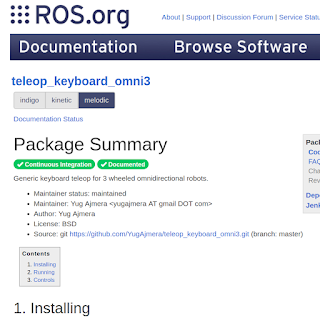
Today, my package got added to the ROS package index (list of all ROS packages). teleop_keyboard_omni3 lets you control a three-wheeled omnidirectional robot using keyboard keys. The Package summary can be found here :  http://wiki.ros.org/teleop_keyboard_omni3 (Installation, launch and usage are included in the ROS Wiki.)

ROS Master

Image
ROS is a type of middleware as explained in the previous blog post. It works as an information center. The Master is the administrator in charge of gathering data, messages, service requests and other information sent by numerous nodes, and connects them to the requested nodes. The identification between the Master and its nodes is through Master IP. Once nodes get Master’s IP and report their own ROS IP to the Master, Master doesn’t care where its nodes are physically set. They can still communicate with them. This is the unique characteristic of ROS for distributed environment. A server is set as the home of ROS Master. Each remote robot is treated as a node to register to the Master. For example let the Master IP be 10.219.10.10 and node IP be 10.219.10.11. IP information is exported in the Master and node bashrc files individually to establish their connection. For Master bashrc file export ROS_MASTER_URI=10.219.10.10 export ROS_IP=10.219.10.10 For node bashrc file export ...

What is ROS ?

Image
A lot of people are still confused about the concept of ROS which includes both those who use them and those who don't. Robot Operating System is an open-source robot middleware platform that provides hardware abstraction, device drivers, and many useful libraries and tools to develop robot applications. Developed in 2009, initially for the use with the Willow Garage PR2 robot, ROS has now a large community of developers and users. This community has developed important general-use libraries for motion planning, task execution, 2D navigation, and visualization and a lot more that has proved invaluable standards in robotics research. Despite its many advantages, ROS has several shortcomings with regards to usability, portability, and platform dependencies. For ROS, the officially supported operating system is Ubuntu, a popular Linux distribution. All these problems are now solved in the second version called ROS2. ROS has a microkernel design where a large number of small tool...

Install TurtleBot on ROS Kinetic (Ubuntu 16.0.4)

Image
I faced a lot of problem while installing the TurtleBot on the ROS Kinetic. Follow this to install it successfully: sudo apt-get install -y linux-headers-generic sudo apt-get update sudo apt-get install ros-kinetic-librealsense sudo apt-get install ros-kinetic-turtlebot* sudo apt-get install ros-kinetic-ar-track-alvar-msgs Type " roslaunch turtlebot_ " and press tab twice. If you get the following packages,it is successfully installed !